Patient Alerts by Text
Veterinarians and pet owners can choose to get patient status alerts by text in the Sage Referral & Care Portal under Settings → Notifications.
Who can sign up
Veterinarians who refer patients to Sage Veterinary Imaging, and pet owners whose pet is a Sage patient. Text alerts are optional.
How to sign up
Sign in to the Sage Referral & Care Portal.
Open Settings → Notifications.
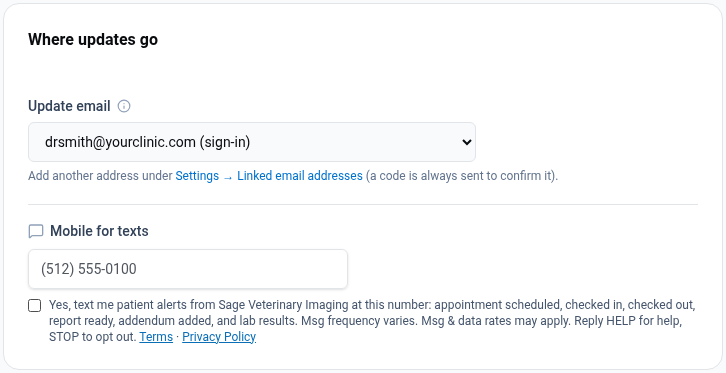
Enter your mobile number under "Mobile for texts."
Check the consent box, which is unchecked until you check it, and save.
The consent box (see screenshot below)
The text below appears in our portal under settings —> notifications.
☐ Yes, text me patient alerts from Sage Veterinary Imaging at this number: appointment scheduled, checked in, checked out, report ready, addendum added, and lab results. Msg frequency varies. Msg & data rates may apply. Reply HELP for help, STOP to opt out. Terms · Privacy Policy
What we send
Status alerts about patients you referred or your own pet: appointment scheduled, checked in, checked out, imaging report ready, report addendum added, and lab results received. We do not send marketing messages by text.
Example: "Sage Veterinary Imaging: The imaging report for Bella (Garcia) is ready. View it in the portal. Manage alerts in portal settings. Reply STOP to opt out, HELP for help."
How often
Message frequency varies with the patient's care. You may receive several messages on days a case is active and none when no case is active. Msg & data rates may apply. Consent is not a condition of any purchase or service.
Help and opting out
Reply HELP for help. Reply STOP at any time to stop texts. You can also turn texts off in Settings → Notifications. These are patient medical alerts, so if you opt out you will miss future alerts about your patients. For help, call Round Rock 512-688-9404, Spring 281-205-4050 or Sandy 385-707-5361.
Screenshot
The opt-in panel below appears in our portal under settings —> Notifications.